AI Agents in Software Testing: Who Defines, Who Builds, Who Verifies
AI agents in software testing create and maintain tests. Who defines what matters, who builds, and who verifies the application at every run.
AI agents in software testing create and maintain tests. People define what each test must check, a repeatable engine runs the saved test and verifies the application at every run, and a visual timeline keeps everyone in control.
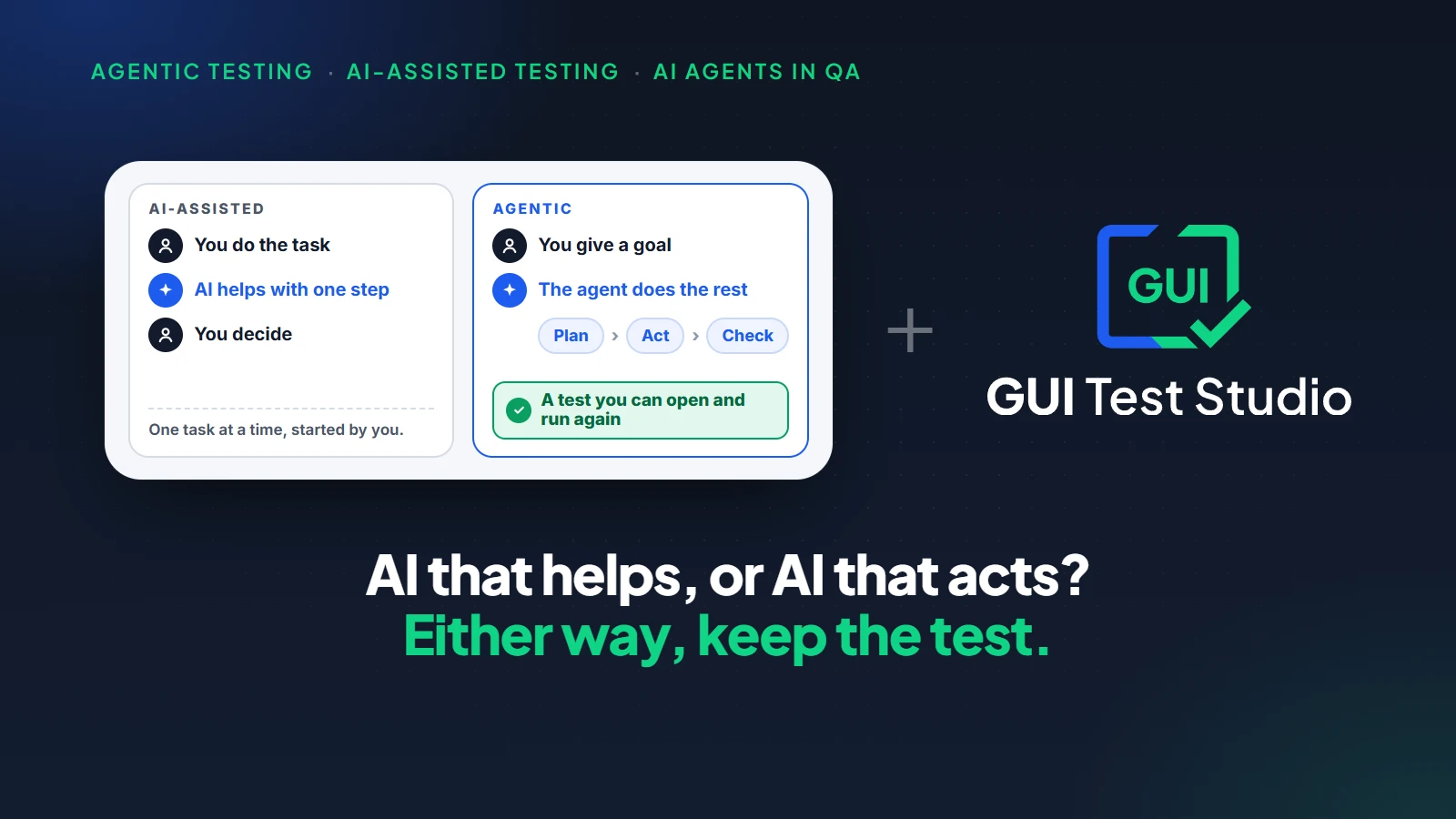
Your team can now ask an AI agent for a test and get one in minutes. That is when the real questions start. Who decided what the test checks? Can anyone on the team read it? What does it cost to run it a thousand times? The question is no longer people or AI. It is who does what.
What do AI agents do in software testing today?
Definition
An AI agent in software testing is an AI model that is given a goal and works toward it by itself.
- It opens the application, performs the steps, adds the checks and reports back.
- One request can produce a whole test.
- Another can change a test that already exists.
What an agent does not bring is the knowledge of what your product must do.
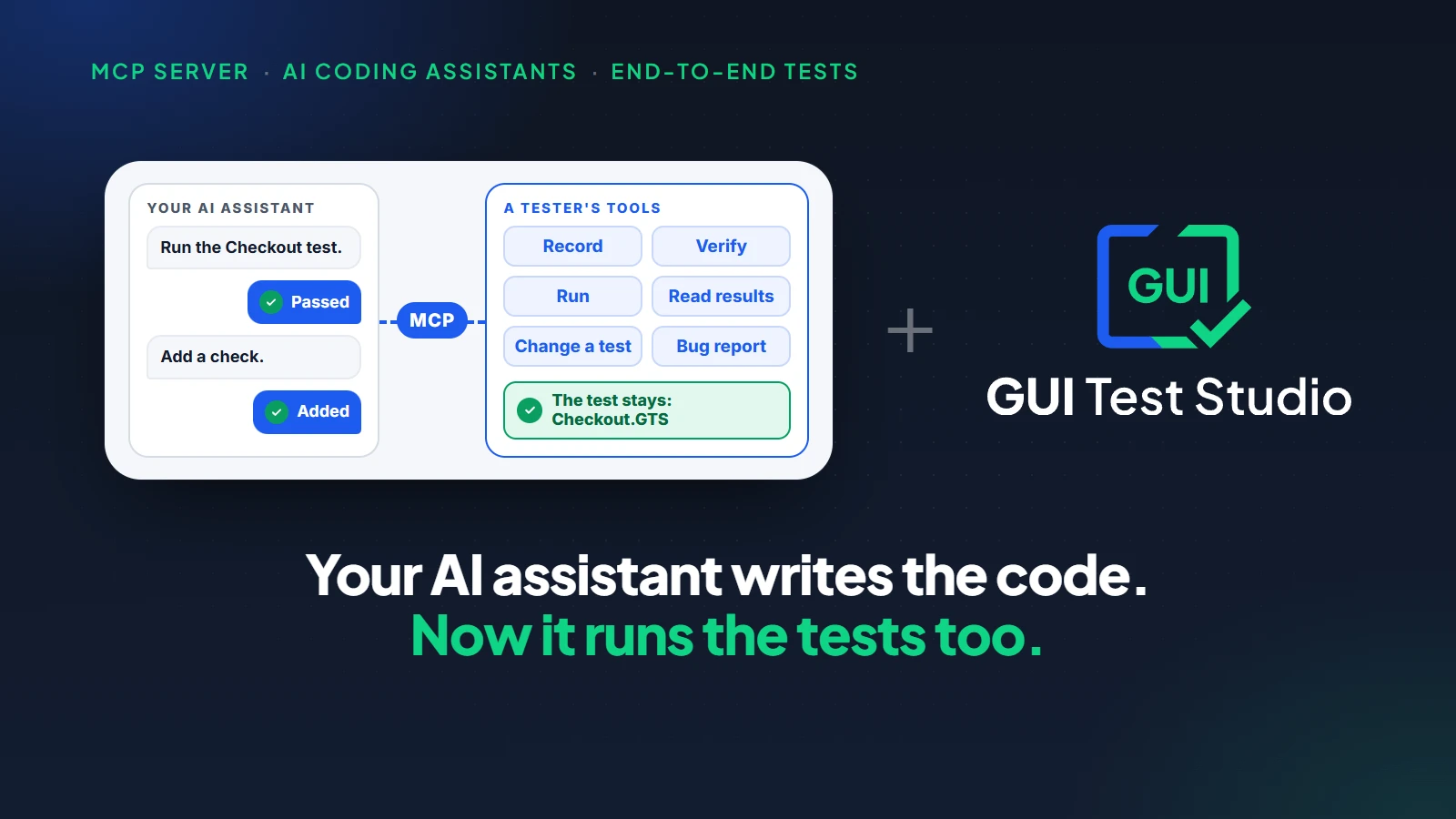
An agent reaches a testing tool through an MCP server, a standard way to give an AI assistant tools.MCP server for testing explains the connection, and agentic testing vs AI-assisted testing explains how an agent differs from plain AI help.
AI agents in QA: who defines, who builds, who verifies
The useful answer is a split into four jobs, each given to whoever does it best. It is the split GUI Test Studio is built on: a shared testing solution where QA teams and AI agents build, execute, and manage tests visually, without code scripts.
1People
Define what matters
QA engineers, developers and domain experts decide what each test must check.
2An AI agent
Creates and maintains the test
It builds the test from a prompt or a design, and changes it when asked.
One visual test, shared by everyoneCheckout.GTS
3The engine
Verifies the application
It runs the saved test the same way at every run, with no call to an AI model.
4People
Stay in control
Everyone reads the test on a timeline, and each run's report in plain words.
| The job | Who does it | What it means in practice |
|---|---|---|
| Define what matters | People: QA engineers, developers and domain experts. | They decide which workflows deserve a test, and what each test must check. |
| Create and maintain the tests | An AI agent, when the team wants one. | It builds a test from a prompt or a design, and changes it when asked. |
| Run the tests and verify the application | A repeatable execution engine. | It runs the saved test the same way at every run, with no call to an AI model. |
| Stay in control | People, through a visual timeline and reports. | Everyone reads what a test does and what a run found, without reading generated test scripts. |
People review a test. The engine verifies the application.
Why people still define what a test must check
An agent sees your screens. It does not see your contracts, your support tickets or last year's incident. A test it builds checks what it was told to check, and someone has to do the telling.
Three kinds of people hold that knowledge.
- QA engineers know where the application tends to break, and which workflows carry the risk.
- Developers know what changed in this build, and what it could touch.
- Domain experts, such as a product owner or an accountant, know what the right result is.
Asked to test the checkout, an agent may check that the confirmation page opens. That test passes on a shop that charges the wrong amount.
A QA engineer adds two checks: the total must read 49.00, and an order number must appear. The agent built the test, and a person decided what it proves.
The checks a test can make are listed in Choose what a test verifies.What this means for the job itself is in what a QA tester does when AI writes the tests.
What AI test agents are good at: creating and maintaining tests
Building a test is patient, repetitive work: open the application, click, type, wait, check, name each step. An agent does it in minutes. The decisions around that work stay with the team.
| Part of the work | What an agent does well | Where the team keeps the decision |
|---|---|---|
| Creating a test | Turns a described workflow, or a design, into steps and checks. | Which workflows deserve a test. |
| Choosing the checks | Proposes checks for what it sees on the screen. | What must be true for the user. |
| Maintaining a test | Makes the change you ask for in a saved test. | Whether the application or the test is right. |
| Reading a failed run | Reads the results and sums up what the report found. | Whether it is a bug, or a change made on purpose. |
In GUI Test Studio an agent builds a test from a prompt, as Create a test from a prompt shows.It can also start from a Figma design, before the application exists: see generate tests from Figma designs.When it changes a saved test, it shows the change and asks before it writes.
Why a test should be a visual timeline, not generated code
What an agent leaves behind decides who can work with it afterwards. There are three possibilities.
A generated test script
Who can read it: people who read code
An agent's conversation
Test the checkout.
Done. Everything works.
Who can read it: nobody, a week later
A shared visual timeline
Who can read it: QA engineers, developers, product owners, and the agent
Generated test code can be the right choice for a team of programmers. With a coded framework such as Playwright, Selenium or Cypress, someone still has to read every generated line and keep it up when the application changes. The people who know what the test should prove are often not the people who can read it. A conversation is a weaker record still: a week later, nobody can open it to see what was checked.
A visual test is one thing both sides work on.In GUI Test Studio every step and every check is a named block on a timeline.What an agent creates, a person reads and edits there, and the other way round.Nobody reads generated test scripts, because there are none.Work on the timeline shows how it looks.
Why running and verifying a test should not call an AI model
A test is created once. It runs thousands of times: on every build, for every branch, every night.
Two things change when an AI model decides every one of those runs.
Repeatability
A model that decides again at each run may take another path tomorrow, so a failure can come from the run and not from your application.
Cost
Every run also pays for its calls to the model, and the bill grows with every test and every build.
In GUI Test Studio the saved test is run by the product's own engine, the GTS Engine.It performs the same steps in the same order and checks every expectation, the same way at every run.See repeatable AI testing, and how GUI Test Studio finds elements on the screen.
When the test is built or changed
An AI model may work here
Once, when someone asks for it.
When the test runs
- Build 4120 calls to an AI model
- Build 4130 calls to an AI model
- Build 4140 calls to an AI model
We measured it on a 4-step test.Running and verifying the saved test made 0 calls to an AI model.An AI agent working alone made 2 calls and used about 5,400 tokens for one run of the same test.Both reached the same verdicts, so the difference is what each run consumes.The method and every number are in our benchmark.
| For one run of a 4-step test | A saved test, run by the engine | An AI agent working alone |
|---|---|---|
| Calls to an AI model | 0 | 2 |
| Tokens used | 0 | About 5,400 |
How a QA team and an AI agent work together: a checkout test
Here is one test, from the first request to a failed run, with each of the four jobs in its place.
- 1
The agent builds the test from a prompt
A developer writes to Claude, connected through GUI Test Studio's MCP server: "Create a test for the shop: sign in as the test customer, add the desk lamp to the basket, pay with the test card, and check that the page says Order confirmed."
The agent performs the steps on the real screen, and tries each check as it adds it. A check that could not pass is refused. The result is saved as an ordinary test file.
- 2
A QA engineer reviews the test and adds the check that matters
She opens the test in GUI Test Studio and reads it on the timeline: sign in, add to basket, pay, then a check of the confirmation message. One thing is missing: nothing checks the amount.
She adds a check that the total reads 49.00, and one that an order number appears, whatever its value. It takes a few minutes and no code. She could also ask the agent to add them.
- 3
The engine runs it on every build
The pipeline runs the test with one command, as Run tests in your pipeline describes.The same steps replay in the same order, each check waits for its element, and no AI model is called.Nobody watches the runs.
- 4
A failed run says what changed
Three weeks later a run fails.The Confidence Report shows the step, the expected picture beside what the run found, and the reason: the Confirm order button changed from active to disabled.
The team decides: a bug report, already filled in from the run, or one click to accept a change made on purpose.How to read a test report walks through such a failure.
What to ask before you let an AI agent near your tests
Seven questions tell you whether your team stays in control once an agent is at work.
| Ask | A good answer |
|---|---|
| What does the agent leave behind? | A saved test that anyone can open, and not only a script or a conversation. |
| Can someone who does not code read every step? | Yes: each step and each check is a named block on a timeline. |
| Does a run need an AI model? | No: the saved test runs by itself, the same way at every run. |
| Was each check tried when it was made? | Yes: a check that could not pass on the screen is refused. |
| Does the agent ask before it changes a saved test? | Yes: it shows the change and waits for your answer. |
| What does a failed run tell us? | What changed, with the expected picture beside the actual one, in plain words. |
| Who chooses the AI, and where do the tests live? | You do. The tests, the recordings and the reports are files on your own computers. |
A longer list for a buying decision is in AI testing tools: 7 questions to ask before you choose one.
AI is optional: your team chooses none, local or cloud
None of this needs AI to work. The AI is a part the team chooses: none, a local AI model that we provide or that you bring, or a cloud AI. The choice can change without rewriting a test.
| Your choice | Creating and changing tests | A second look at a failed check |
|---|---|---|
| No AI | You record a test by doing the workflow once, and edit it on the timeline. | Off. Every check gets its verdict from the engine. |
| A local AI model, one we provide or one you bring | It builds a test from your prompt, on your own computer. | It explains a failed check, on your own computer. |
| A cloud AI | The assistant your team already uses: Claude, or ChatGPT with Codex. | OpenAI or Anthropic, with your team's own key. |
Whatever the choice, running and verifying stay the same, and the tests remain yours.That is the subject of AI sovereignty in software testing.Every feature is in the 30-day trial, and the plans are on the pricing page.
What to know before you start
| Limit | What it means |
|---|---|
| A test checks what it was told to check | A vague request gives a vague test, so say what must be true at the end of each workflow. |
| A run uses the real screen | Keep your hands off the mouse and the keyboard during a run. A web test can also run without a browser window. |
| A local AI model is slower | A local AI model, ours or your own, is best with short workflows. A cloud assistant builds long tests faster. |
Key takeaways
- 1AI agents create and maintain tests. The question for a team is no longer people or AI, but who does what.
- 2Humans define what matters: QA engineers, developers and domain experts decide what a test must check.
- 3AI helps create and maintain tests: an agent builds a test from a prompt or a design, and changes it when asked.
- 4A repeatable execution engine verifies the application at every run, and running and verifying need no call to an AI model.
- 5A visual timeline and understandable reports keep humans in control: people review a test, and nobody reads generated test scripts.
Questions
What do AI agents do in software testing?
AI agents create and maintain tests. Given a goal in plain words, an agent opens the application, performs the steps, adds the checks and saves a test, and it changes that test later when asked. People still decide what each test must check.
Will AI agents replace QA engineers?
No. An agent builds a test quickly, but it does not know which workflows carry the risk or what the right result is. QA engineers, developers and domain experts define what matters, and the agent does the building.
Who verifies the application when an AI agent built the test?
The execution engine does, at every run. In GUI Test Studio the saved test is run by the product's own engine, which performs the same steps and checks every expectation the same way each time. The agent is not needed for a run.
Does a test created by an AI agent call an AI model at every run?
Not in GUI Test Studio. Running and verifying a saved test makes 0 calls to an AI model. In our measurement, an AI agent working alone made 2 calls and used about 5,400 tokens for one run of a 4-step test.
Do people have to review every test run?
No. People may review a test: is it the right test, and does it check what matters? The engine verifies the application by itself at every run, and a report says what changed when a run fails.
How does an AI agent connect to a testing tool?
Through an MCP server, a standard way to give an AI assistant tools. GUI Test Studio's MCP server connects Claude Desktop, Claude Code, ChatGPT with Codex and VS Code. A local AI model works too, one we provide or one you bring.
Why not let the AI agent write test scripts?
Because someone then has to read, review and maintain the generated code. That works for a team of programmers, and it leaves out the people who know what the test should prove. A visual test is read and changed by everyone, and by the agent too.
Can I use GUI Test Studio without AI?
Yes. You record a test by doing the workflow once, edit it on the timeline and run it, with no AI anywhere. An AI agent and the AI second look at a failed check are parts you add when you want them.
Claude, ChatGPT, Codex, VS Code, Figma, Playwright, Selenium and Cypress are trademarks of their respective owners.