
End-to-end testing
End-to-end testing, without writing a line of code
End-to-end (E2E) testing checks a complete user journey, the way a real user goes through it.GUI Test Studio makes creating and maintaining full End-to-End interactions and verifications as fast, visual, and easy as editing a video timeline, all powered by secure, on-premise Vision and AI.Record the journey, or describe it in a prompt: human friendly, AI-agent friendly.
The problem
Why end-to-end tests are hard to keep
End-to-end tests catch the bugs users meet.Yet most teams automate few of them, for the same three reasons.
Scripts take weeks to write
Every journey becomes test code, and someone has to write it before a single check runs.
Tests break when the page changes
A renamed button or a moved field breaks the selectors, and a passing feature reads as a failing test.
Only developers can keep them
The people who know what to test are rarely the ones who can maintain the code that tests it.
How it works
End-to-end testing the way you already test by hand
- 1
Record, or describe
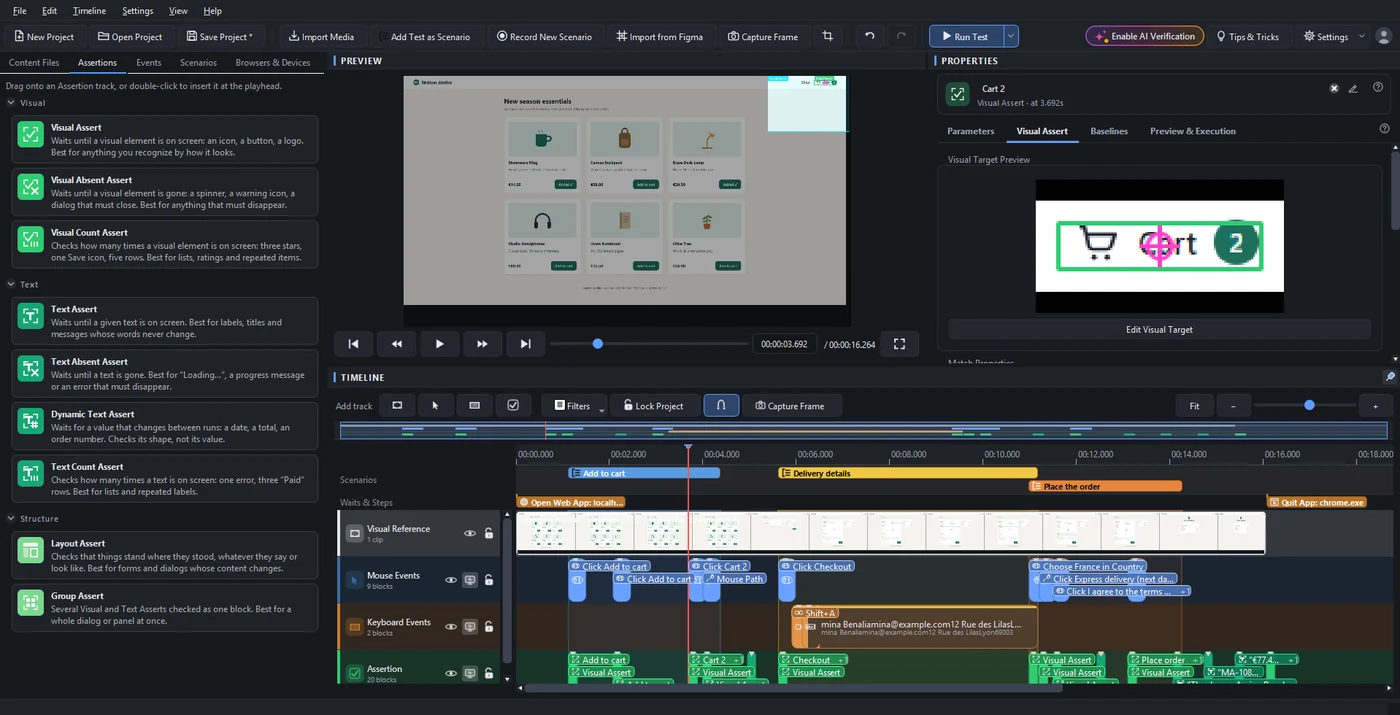
Use your application as a user would, or describe the workflow in a prompt and your AI assistant does it for you.Every click, key and gesture is recorded on the real screen, with the checks of what appeared.
- 2
Verify
Visual, text, layout and group checks confirm what the user sees: the right element, the right words, in the right place.
- 3
Edit like a video
Refine the test on a timeline: move, trim, rename and group steps, with undo for everything.Or just ask the AI for the change in a prompt.
- 4
Run on every build
Run it from the app, or from your CI/CD pipeline with the command-line runner.
- 5
Read the report
The Confidence Report says what passed, what failed and why, in plain words, with the pictures to prove it.
What you can test
End to end, on anything your screen shows
Web apps
Any browser.Record once, then run in Chrome, Edge and Firefox, on phones, tablets and screen sizes.
Desktop software
Windows applications of any toolkit, even the ones other tools cannot see.
Mobile screens
Android and iPhone screens on your computer, tested like any application.
Virtual machines
macOS or Linux running in a virtual machine on Windows.
Games
Menus, interfaces and gamepad input, checked by what the player sees.
Questions
End-to-end testing, answered
See GUI Test Studio on the kind of app you test: book a free 30-minute call with our team.
Or start on your own: the guides walk you through your first test in a few minutes.
Learn more